| We hope you enjoy your visit. You're currently viewing our forum as a guest. This means you are limited to certain areas of the board and there are some features you can't use. If you join our community, you'll be able to access member-only sections, and use many member-only features such as customizing your profile, sending personal messages, and voting in polls. Registration is simple, fast, and completely free. Join our community! If you're already a member please log in to your account to access all of our features: |


- Pages:
- 1
- 2
| DVD Burning | |
|---|---|
| Tweet Topic Started: Mar 26 2005, 08:25 PM (521 Views) | |
| joe-hpt | Mar 26 2005, 08:25 PM Post #1 |
|
Non Omnis Moriar.
  ![]](../../../../0/1/0/p601690/pipright.png)

|
If your computer has CD burning capabilities can it also burn DVDs or do you have to have a DVD burner as well? |

 |
 
|
| huricane | Mar 26 2005, 08:26 PM Post #2 |

Member
|
You have to have a DVD Burner as well. A CD burner and DVD burner are two different devices. |
|
|
|
| Peachy | Mar 26 2005, 08:26 PM Post #3 |
|
:P
|
>_< that made no sense. You can get CD/DVD burners or you can get them seperate. But you can't burn DVDs on a CD-RW, it must be compatible with both |
|
|
|
| joe-hpt | Mar 26 2005, 08:28 PM Post #4 |
|
Non Omnis Moriar.
|
How do I know if my computer has a DVD burner? |
|
|
|
| Brian S. | Mar 26 2005, 08:31 PM Post #5 |
|
Member
|
The device should be on the front of the CPU(where you insert floppy disks, CDs, etc.) Look for a small logo that says DVD. |
|
|
|
| joe-hpt | Mar 26 2005, 08:32 PM Post #6 |
|
Non Omnis Moriar.
|
ANd what should it say/look like? |
|
|
|
| Smokey_123 | Mar 26 2005, 08:34 PM Post #7 |
|
FroŽen Gaming
|
it will say DVD-rom burner  
|
|
|
|
| Brian S. | Mar 26 2005, 08:37 PM Post #8 |
|
Member
|
Or: (More here) |
|
|
|
| joe-hpt | Mar 26 2005, 08:38 PM Post #9 |
|
Non Omnis Moriar.
|
when I look my cd-rom part says "hp-cd write" and my dvd part says "dvd-rom". |
|
|
|
| Smokey_123 | Mar 26 2005, 08:38 PM Post #10 |
|
FroŽen Gaming
|
brian, that links to microsoft website, relink :wacko: |
|
|
|
| Smokey_123 | Mar 26 2005, 08:39 PM Post #11 |
|
FroŽen Gaming
|
does it say "dvd-rom burner"?  ((sorry about double post)) >_< PS it may look like this too 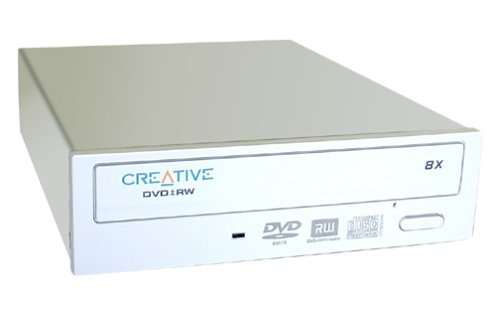 ^^^dvd-rw |
|
|
|
| joe-hpt | Mar 26 2005, 08:43 PM Post #12 |
|
Non Omnis Moriar.
|
no it doesn't say burner. unless i missed something |
|
|
|
| Smokey_123 | Mar 26 2005, 08:44 PM Post #13 |
|
FroŽen Gaming
|
look for RW, if it doesnt have that then it isnt a dvd burner |
|
|
|
| Peachy | Mar 26 2005, 08:44 PM Post #14 |
|
:P
|
since ROM stands for Read Only Memory that would be a bit contradicting unless your burner does both your out of luck. Easiest way for you to find out would prob be to run Windows Explorer (or whichever your OS is) and check a look at the name for you CD drive |
|
|
|
| joe-hpt | Mar 26 2005, 08:46 PM Post #15 |
|
Non Omnis Moriar.
|
Well it probably isn't. See yah guys later. I have to go now. |
|
|
|
| 1 user reading this topic (1 Guest and 0 Anonymous) | |
| Go to Next Page | |
| « Previous Topic · Community Chat · Next Topic » |
- Pages:
- 1
- 2
| Track Topic · E-mail Topic |
 1:03 PM Jul 13 1:03 PM Jul 13
|